
#Define an HTTP action
An HTTP action is one endpoint — a method and a path — with the parameters, request body and response body that make its fields selectable in a service task, plus its retries and streaming.
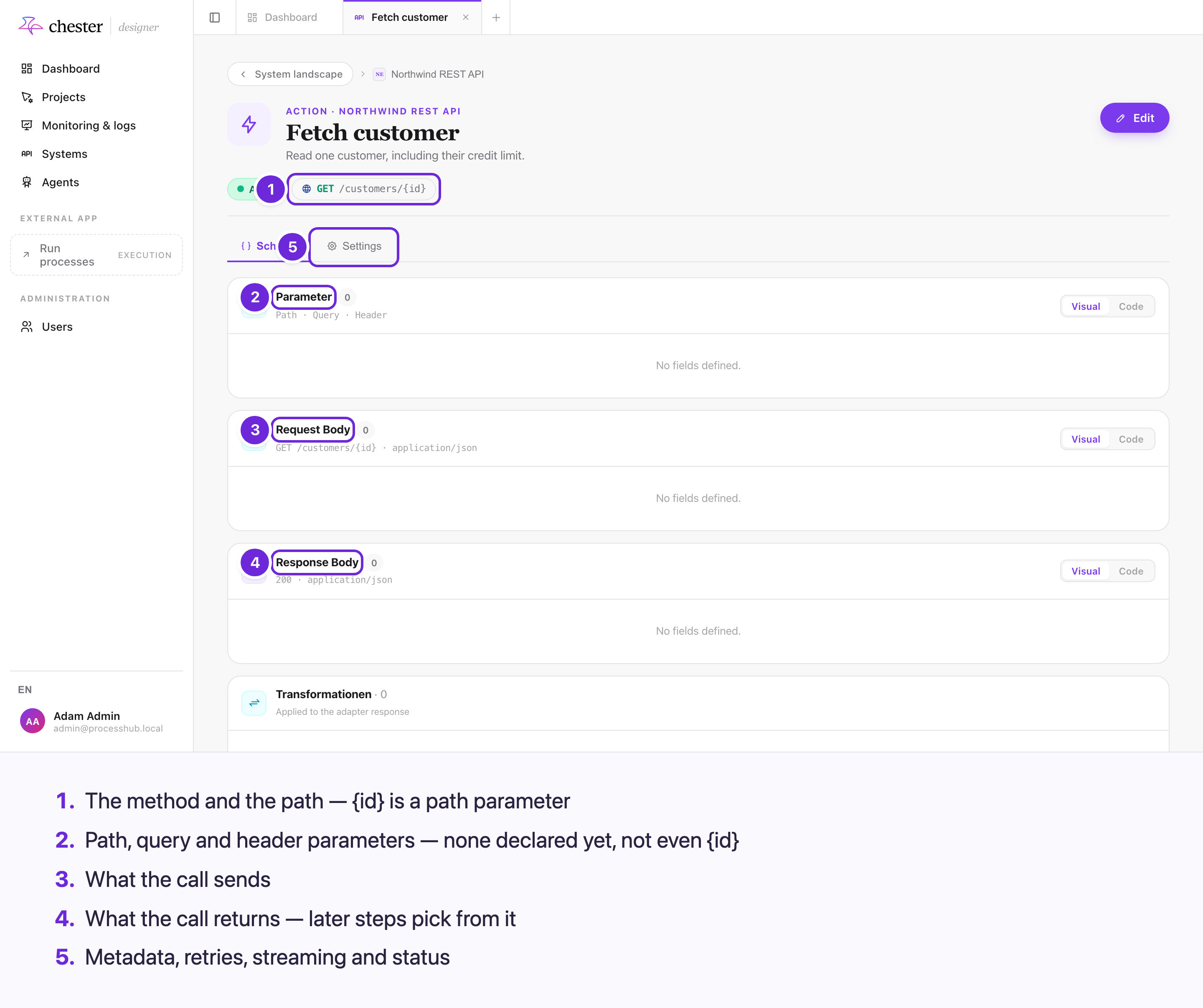
#What an action decides
flowchart LR
  A["Action<br/>GET /customers/{id}"] --> P["Parameter schema<br/>→ the task's Path / Query / Headers"]
  A --> B["Request body schema<br/>→ the task's Request body"]
  A --> R["Response body schema<br/>→ what later steps can pick"]
Everything a service task offers to fill in, and everything later steps can read from its answer, comes from the action's schemas.
#Create an action
- Open the adapter, tab Actions, and click Create action.
- Enter a Name, optionally a Description, the Method — GET, POST, PUT, PATCH or
DELETE — and the Path, for example
/customers/{id}. - Click Create & open. The action's page opens; add its schemas there.
Actions imported from an OpenAPI file already have their schemas — see Connect a REST API.
#Describe what it sends and returns
The Schema tab has three cards, each with a Visual and a Code view:
- Parameter — the path, query and header parameters, each with a name, type and whether it is required. A path parameter is always required.
- Request Body — the fields the call sends.
- Response Body — the fields it returns. This is what the variable list offers after the task.
⚠️ A {name} in the path is not a parameter by itself: add a Path parameter with the same
name, or the value is not filled in.
⚠️ The content type — JSON, a form upload, a file — cannot be chosen here. It comes from the OpenAPI import; a hand-made action sends JSON.
See Schemas and transformations for editing the fields.
#Settings
On the Settings tab, after Edit:
| Card | Setting | What it does |
|---|---|---|
| Request | Method, Path | As above |
| Metadaten | Summary, Description, Tags | Shown in lists and the action picker |
| Behaviour | Streaming aktivieren | For AI APIs that stream their answer: Chester collects the stream into one answer |
| Wiederholungsversuche, Delay (ms) | Retries on failure — 3 and 5000 unless set, at most 10 | |
| Status | Action aktivieren, Als veraltet markieren | See below |
⚠️ With streaming on, the answer no longer has the shape of the Response Body schema.
⚠️ A retry count of 0 is treated as 3. See
Call a system with a service task.
#Inactive and deprecated
- ⚠️ Inactive has no effect. The page says the action "will not be executed", but it is still offered in the picker, deployed and run.
- Deprecated keeps the action usable, but warns in its details and hides it from agents.
#What you cannot do
- ❌ Delete or duplicate a single action.
- ❌ Declare cookie parameters.
- ❌ Import more actions from a file after the adapter was created.
⚠️ Many labels on the action's page are German whatever the language of the screen: Aktiv, Metadaten, Wiederholungsversuche, Streaming aktivieren, Action aktivieren, Transformationen.