
#Retry a failed step or interrupt a run
A step that failed after its automatic retries can be run again from monitoring, with its input corrected first if needed; a run that is still running or waiting can be interrupted, which cannot be undone.
#From failure to retry
stateDiagram-v2
  [*] --> Running
  Running --> Retrying: step fails
  Retrying --> Running: attempt succeeds
  Retrying --> Failed: retries used up
  Failed --> Running: Try again … (from monitoring)
  Running --> Cancelled: Interrupt workflow
  Running --> Completed
#Retry a failed step
- Open the run in Monitoring & logs. The error banner names the failed step.
- Click Try again … in the banner, or Run element again … on the step's card.
- In Re-run element, check the Draft input: change a value under Fields or in JSON. Original input shows what the step received the first time; Reset to original throws your changes away.
- Click Retry with draft — or Retry with original if you changed nothing.
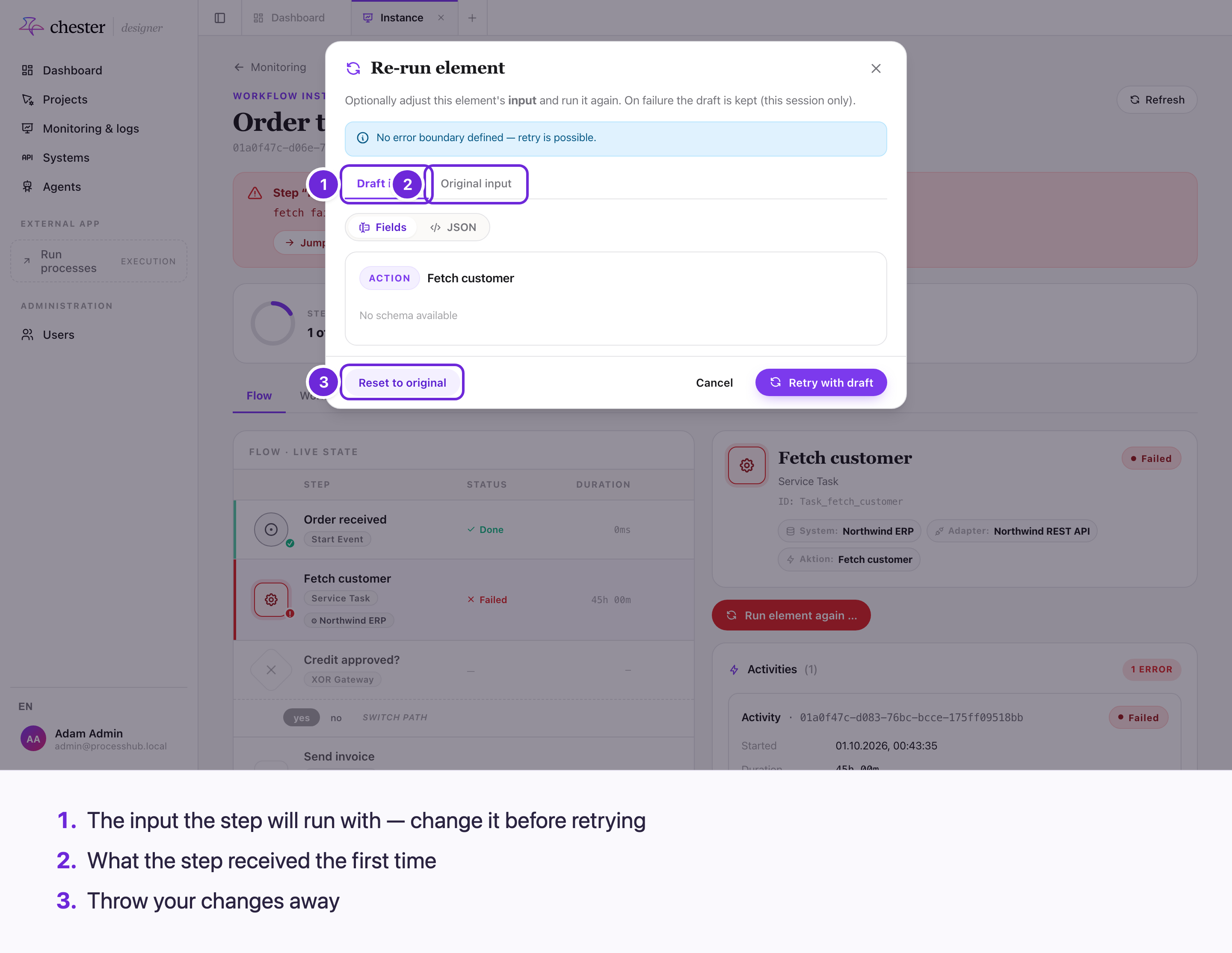
The step runs again with the data the run had at that point. The steps before it are not repeated, and the run continues from there. A step inside a sub-process or a called process continues its parents as well.
What can be changed: the action's parameters and request body, the inputs of a sub-process or a call activity, and a form's input values. Headers cannot.
The dialog closes when the step has been started again — not when it succeeded. Refresh the page to follow it.
#When retrying is not offered
- The step has an error boundary event. The boundary path handles the failure instead.
- An event-based gateway, or an event behind one whose race is already decided.
- A failure that only passes on another — "Child workflow completed with error" on a sub-process. Retry the step inside, where the failure happened.
- A step that is still retrying automatically. Wait until its attempts are used up.
#Interrupt a run
A run that is still running or waiting can be stopped: Interrupt workflow in its header. Its status becomes Cancelled.
- ❌ It cannot be undone.
- ⚠️ There is no confirmation, and no message if it fails.
- ⚠️ A failed run cannot be interrupted from monitoring — the button is only shown while a run is running or waiting.
- ⚠️ Tasks the run left open, timers and registered webhooks may not be cleaned up when it is interrupted.
#Who can do this
Everyone who can open monitoring can retry and interrupt any run. The Execution app offers neither.